Choosing the right camera for your needs
Have you ever wonder why the picture you took with your phone camera just doesn’t look the way you wanted?
You let AI enhance the image, but it still doesn’t look right. Even worse, it starts enhancing areas you don’t want it to enhance, like people’s faces.
This guide is written for those who are looking to use a standalone digital camera, and not a film or phone camera.
If you are serious about getting a standalone camera, here are a few factors to consider when choosing the right camera that fits your needs.
Price
Finding a good camera that suits your budget can be a daunting task. Good cameras are rarely cheap and cheap cameras are rarely good. However, the price alone often discourages people from taking the next step towards a standalone and just stick with their integrated phone camera. That is fine too if you don’t need the extra features.
If you see a camera for less than $100 on amazon with unfamiliar brands, do not buy one or give it as a gift. For the price, you will get a very low quality glass, if not plastic. Avoid plastic lenses at all costs.
Let’s start with three price categories.
- Budget ($100 – $400)
Budget does not mean low quality. These cameras usually have smaller sensors, integrated lenses with a narrow zoom range, LCD screens, and no flash hot shoe. However, they are great for candid, street, and most general-purpose photography. It is generally not recommended to print images taken with these cameras larger than 8″ × 10″.
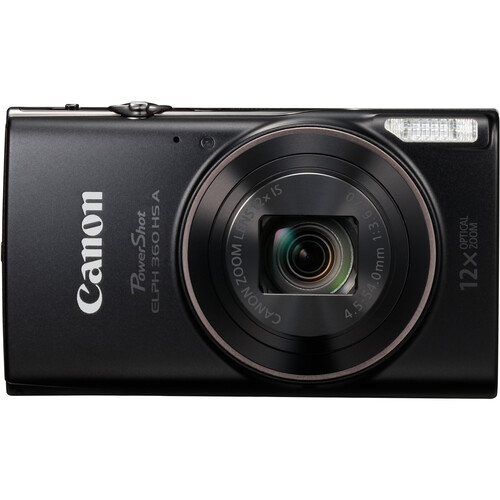
Canon PowerShot ELPH 360 HS
Best value point-and-shoot Camera for candid and multipurpose photography.
- Mid($400 – $1,000)
Mid-range cameras mostly use APS-C-sized sensors with some come with full frame. They usually have a wider zoom range if the lens is built in. Some mid-range cameras can use interchangeable lenses, which are great for shooting different genres of photography, such as landscapes, architecture, portraits, sports, and more.
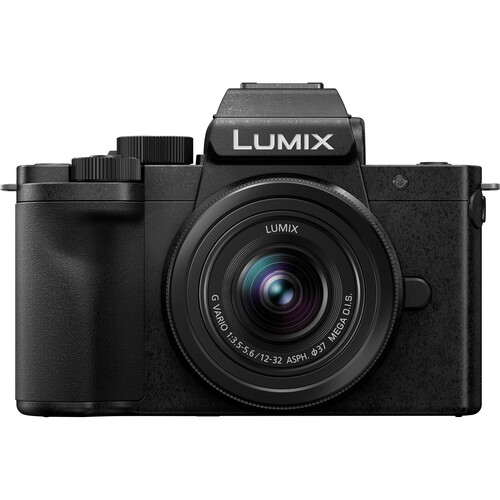
Panasonic LUMIX G100D
Professional grade features, produce large prints. Great for events like weddings in low light conditions.
- High($1,000+)
High-end cameras are feature-rich, typically have larger sensors, and allow the use of multiple lenses. Generally, these types of cameras are used by professional photographers for editorial, sports, fashion, and architectural photography. A larger sensor can produce images with greater detail and better image quality, allowing you to print in larger formats, even up to poster size, with some enhancement. Larger sensors can also provide better performance in low-light situations, especially when paired with a fast lens, helping to produce cleaner images with less noise.

Hasselblad X2D II 100C
For fine art photography, large format sensor creates large prints without sacrificing detail.
Because some cameras are considered luxury and collectible items, there is a big used market for them. You can get big savings from trusted sellers such as MPB, Adorama, and B & H.
Brand
Historically there are only a few reputable camera brands, these are:
- Nikon
- Canon
- Leica
- Olympus
- Panasonic
- Sony
- Fuji
- Hasselblad
There are other brands not in the list that are built for more professional photographers, artists such as ALPA and Phase One, whose applications are beyond regular consumer use and the price of a car.
The most universally common brands are Nikon and Canon. They have the widest range of options from amateur, prosumer, to professional grade products.
Sony, Fuji, Panasonic and Olympus come next. With comparable, if not better quality than Nikon and Canon on some of their products. They are solid choices for anyone starting out.
On the high end, Leica and Hasselblad are the brand names that are known as the Rolls-Royce of photography. Leica cameras have become collectible items throughout history for its quality, craftsmanship and image sharpness.
Features
Most people don’t need less than half the features on the camera they own. For those who do, these are the significant ones:
- Sensor
The larger the sensor, the larger the print you can produce without sacrificing quality. It also allows more light in a low light situation without underexposing. A higher resolution does not necessarily mean a larger sensor. There are only a few digital sensors out in the market. The most common are: Micro Four Thirds (common in mirrorless cameras), APS-C (also called crop format), full frame (the same size as common film negative), medium format (digital is 44mm x 33mm).
- Image stabilization
Image stabilization is a common feature that most people need. Without image stabilization your image can come out blurry, this is especially helpful when shooting candid, street, or in low light situation where a higher shutter speed is needed to prevent the image from looking grainy or underexposed.
- Video recording
A nice feature to have on digital cameras is video capture. It might not be a feature that most people need. It drains the battery very quickly and requires extra peripheral such as external microphone to get a decent audio because most digital cameras do not have a good quality built-in microphone.
- Wireless connectivity
It is also a nice feature to have that most people do not need. Often times, it requires the use of an extra app on your phone or desktop which can become a hassle to manage and could risk losing data. Stick with having physical memory cards, and a card reader from a reputable brand.
- Viewfinder or display
When people switch from film to digital, there’s a big shift in how people used to operate their cameras. In film cameras, a viewfinder is necessary to compose your shot. Without it, you have to guesstimate your focus area and can only picture the composition in your head before you take it.
In some digital cameras, the viewfinder is an LCD screen. This way of composing is not great when you are in bright areas if the LCD brightness is not bright enough. However, there are cameras with eyecup style viewfinder that lets you look through. Optical is common in rangefinder and DSLR cameras where electronic viewfinders are common in more compact full frame or compact cameras. The trade off between the two is that most cameras with electronic viewfinder drains the battery faster.
Another feature that is common is the flip display. This lets you flip the LCD view so that you can compose where it is physically possible to view the screen. Like when taking a selfie.
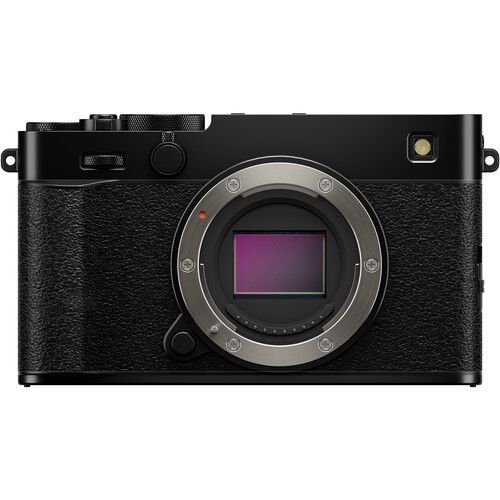
FUJIFILM X-E5
High end digital rangefinder with both flip display and electronic viewfinder.
Size
One of the most common factors everyone always consider when buying a camera is its size. A bulky DSLR camera can be a hassle to carry around. Unless you are shooting wildlife or sports from a distance, you probably don’t need a long telephoto lens.
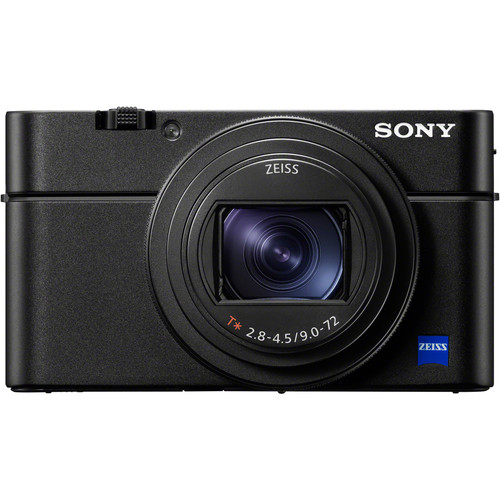
Sony RX100 VII
Best of both worlds, compact digital with optical zoom
A point and shoot camera is usually small in size and easily fits into your pants or shirt pocket, the trade off is the lack of featured such as a large enough flash to cover a large area or digital zoom that is not ideal for making prints.
Process
For the most part, managing digital images are pretty straightforward. A card reader or USB cable that connects directly to the camera should allow you to upload the images to the computer. Backing up to a dedicated hard drive is recommended but optional.
Be aware that not all cameras have the feature that lets you connect to a computer directly via USB to access and upload the files.
Also, some high end cameras like Leica and Hasselblad have large internal storage so that you don’t even really need a memory card. However, external back up is still recommended.
Media
A huge factor in selecting the right camera for you is the media that you want to have in the end.
If you are planning to print your images on large format print media, you will need a camera that takes high resolution image, preferably with a full frame or medium format sensor. For poster sized and oversized prints, usually extra processing is required to achieve excellent print quality.
If you are only printing 4″ x 6″, 5″ x 7″ prints for photo albums, or not planning to print at all then you have a wide range of options.